

Squeeze More Hours from Your Smartwatch Without Sacrificing Use
You can RECLAIM hours of battery life by tuning settings, trimming background tasks, and adopting smarter habits; this concise, technical guide shows precise steps to extend runtime while keeping the features you rely on today.
What You’ll Need
- your smartwatch, companion phone, charger
- access to watch OS settings/apps
- 20–30 minutes for configuration and testing
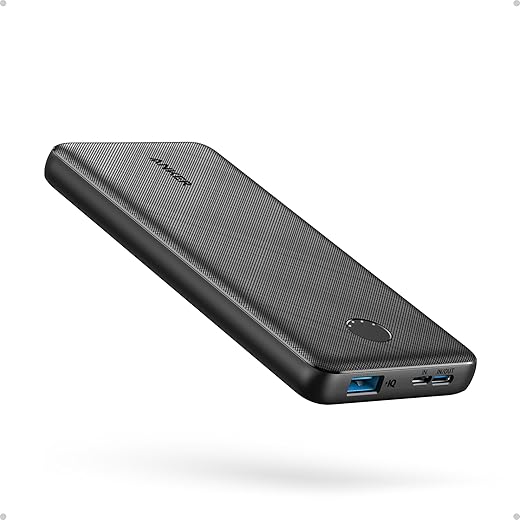
Anker PowerCore Slim 10000mAh USB-C Power Bank
Introducing the Anker PowerCore Slim 10000mAh USB-C Power Bank, your perfect travel companion!
- High-Speed Charging: Experience fast top-ups with its powerful 5V/3A USB-C two-way charging capability.
- Sleek Design: With a compact size of 5.99 x 2.81 x 0.61 inches, it easily fits in your pocket or bag.
- Durable Build: Drop-tested for durability up to 3.2 ft, ensuring it withstands the rigors of travel.
- Peace of Mind: Backed by an 18-month warranty, you can rely on the Anker PowerCore Slim for all your charging needs.
Stay powered up on the go with the Anker PowerCore Slim!
Audit and Prioritize Power-Hungry Features
Open your watch’s Settings → Battery (or companion app) and check the usage report. List the top consumers:
- Display / Always‑On Display
- GPS / Location
- Heart‑rate sensor
- LTE / Cellular radio
- Third‑party apps / Background sync
Decide for each item whether continuous operation is necessary. Disable always‑on display if you rarely glance at time; switch to raise‑to‑wake. Change continuous heart‑rate monitoring to intermittent sampling (for example, from constant to every 5–10 minutes or only during workouts). Set GPS to on‑demand or low‑accuracy mode, or delegate GPS to your phone when possible. Turn off LTE unless you need standalone calls or streaming.
Revoke background permissions and wake locks from apps that don’t require real‑time updates (e.g., social feeds, noncritical widgets). Prioritize only the features you use daily and shift everything else to manual activation. Finally, enable the built‑in low‑power or battery saver mode for situations when you need extra hours and want to keep core functionality like time and notifications.
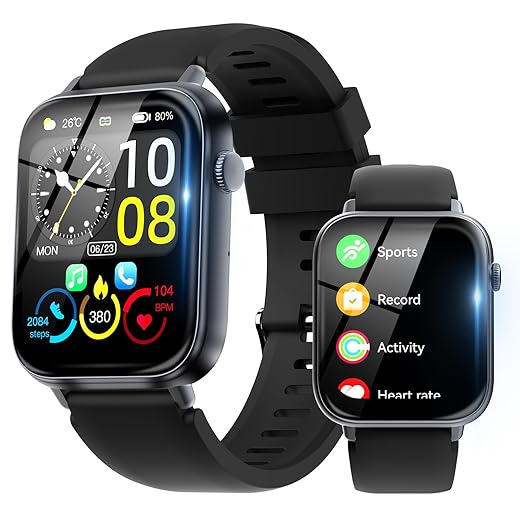
1.85-inch HD Bluetooth Calling Fitness Smartwatch
Experience the ultimate in fitness and connectivity with our 1.85-inch HD Bluetooth Calling Fitness Smartwatch. Enjoy the following features:
- Bluetooth Calling: Make calls directly from your wrist.
- Notifications: Stay updated with notifications right on your smartwatch.
- Heart Rate & Sleep Monitoring: Track your heart rate and sleep patterns 24/7 for a complete overview of your health.
- Sport Modes: Choose from over 110 sport modes to suit your fitness preferences.
- IP68 Rating: Designed to withstand water and dust, perfect for everyday wear.
- Long-lasting Battery: Enjoy approximately 7 days of typical usage and up to 30 days on standby.
This smartwatch is engineered for all-day tracking and seamless cross-platform use, making it the perfect companion for your active lifestyle.
Tame Display and Interface Settings
Reduce display power first — it’s the single biggest runtime lever. Lower brightness manually or set adaptive brightness to a conservative range (for example, cap auto‑brightness at ~30–40%). Turn off Always‑On Display (AOD) or schedule AOD off during sleep hours.
Shorten screen timeout to the minimum comfortable value and disable raise‑to‑wake if you get accidental wakes in daily use. Choose dark or minimal watch faces — prefer OLED‑friendly faces with large black areas and no animated backgrounds. Remove animated complications and unnecessary widgets that refresh frequently.
Lower or disable haptic feedback and reduce vibration intensity to save motor power. Disable notification previews that cause repeated vibrations.
Turn off fluid animations and motion effects in Accessibility or Developer settings where available to cut GPU/CPU cycles. Example: set timeout to 8–12 seconds, brightness to ~30%, disable AOD 11:00pm–7:00am, and swap to a static, dark watch face to see immediate battery gains.
Optimize Connectivity and Syncing
Prefer Bluetooth as your primary link when your phone is nearby — it uses far less power than LTE. Pair on your morning commute and keep LTE off on the watch.
Disable Wi‑Fi scanning and automatic connections when you leave home; turn on Wi‑Fi only to download large files while on the charger. Turn off cellular data on the watch if you rarely use standalone features.
- Use Bluetooth for daily notifications and calls.
- Enable Wi‑Fi only for large downloads at home.
- Switch LTE on only for true standalone needs.
Limit push notifications to essential apps only. Batch notifications and set mail to fetch hourly (or push off) to cut frequent wakeups.
Schedule sync windows for big transfers (music, podcasts, health backups) to run while charging overnight or during a low‑use window. Disable automatic app updates and background app refresh on the watch.
Enable Airplane or Do Not Disturb during sleep or long meetings to prevent constant radio wakeups and extend runtime.
Use Software Tools and Maintenance Habits
Keep firmware and companion apps updated — many releases include battery optimizations and bug fixes. Install updates when you charge the watch so you don’t interrupt a full day.
Uninstall or disable rarely used apps and clear cached data to stop background processes. For example, remove duplicate fitness trackers or infrequently used watch faces that refresh constantly.
Use built‑in battery saver profiles or install third‑party utilities that offer per‑app throttling or scheduled power modes (where available). Set aggressive limits for high‑drain apps during work hours and allow full function for workouts.
Reboot your watch weekly to clear runaway processes and free memory. Monitor battery health metrics if your platform exposes them, and note any abnormal discharge patterns.
Adopt smarter charging habits: top up during idle periods (desk work or commuting), avoid daily 0–100 cycles, and aim for partial charges to preserve capacity.
Finally, test changes methodically—adjust one variable, measure runtime impact, then iterate.
Get Hours Back — Iterate and Measure
Apply these steps, measure real runtimes, and tweak settings iteratively — in one session you can gain multiple hours; over weeks, habits and updates compound. Try it now, report your results, share feedback regularly, and iterate.
Author

Like this deal? Get deals like this every week.