
Instant family sharing that just works — practical, affordable, with a couple of trade-offs.
We hate seeing photos stuck on phones while grandparents and far-away family miss the little, everyday moments. The 32GB FRAMEO 10.1 smart frame tackles that pain point head-on with a bright 1280×800 IPS touchscreen, built-in 32GB memory, and instant, private sharing via the Frameo app so anyone can send photos and short videos from anywhere.
We found it to be a reliably simple way to keep memories visible across households — intuitive touch controls, auto-rotate, and scheduling make it low-fuss. It’s not perfect (it’s corded, videos are brief, and the plastic build feels basic), but for the price it’s a practical, thoughtful gift that actually gets photos where they belong: on display.
FRAMEO 10.1 Inch WiFi Photo Frame

FRAMEO 10.1 Inch WiFi Photo Frame
The FRAMEO 10.1 Inch WiFi Photo Frame is a dependable and easy-to-use solution for showcasing family memories, even when separated by distance. With remote sharing capabilities and app controls, it is ideal for multi-household families and tech-savvy gift recipients.
Quick Overview
We approached this 10.1-inch Frameo-enabled digital frame as a practical tool for keeping family photos in rotation without the fuss of files, cables, or manual transfers. The display uses an IPS panel at 1280×800, delivering crisp images with broad viewing angles, and the Frameo app is the hub for sharing photos and short videos directly to the frame from anywhere.
What’s in the box and first impressions
On unboxing, we appreciated the compact size and lightweight design. The detachable stand gives you instant portrait or landscape placement without extra tools. The touchscreen is responsive and the menu hierarchy is straightforward — good news for non-technical household members.


Detailed Feature Walkthrough
Display and presentation
Color accuracy is respectable for a consumer frame: bright daylight shots look lively and faces remain natural, though deep blacks and extreme contrast aren’t comparable to high-end OLEDs. The touchscreen lets us pinch-zoom and swipe through albums, and captions display cleanly when enabled.
Connectivity, app, and sharing experience
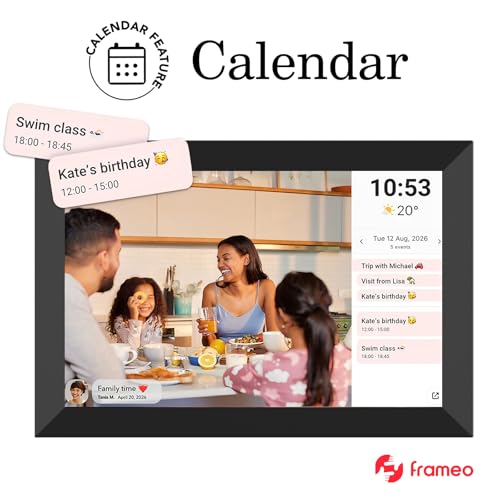
The standout feature is how easily relatives can send a photo from their phone — no cloud account setup required beyond the Frameo app. We tested sending pictures from several devices and found transfers to appear within seconds on a stable home Wi‑Fi network.

Storage, formats, and limits
| Item | Detail |
|---|---|
| Internal storage | Approximately 32 GB built-in for many thousands of photos |
| Expandability | microSD slot for additional space |
| Supported images | JPG, JPEG, BMP, PNG |
| Supported video | MP4 (short clips — typically capped near 15 seconds) |
While the included storage is ample for everyday use, we recommend using a microSD card if you plan to keep large libraries or many short video clips on the device.
Controls, customization, and daily use
We liked that the frame adapts to a daily routine: it can enter sleep mode overnight and wake with a schedule. This reduces power draw and prevents screen burn-in over long use.
Practical Use Cases and Placement Tips
Placement tips: position the frame where faces are most likely to be seen at eye level, avoid direct sunlight to maintain contrast, and use the detachable stand for quick orientation changes. If you prefer wall mounting, we recommend a small, secure bracket and careful cable routing since the unit is not battery-powered.
Privacy and Security Notes
Troubleshooting and performance tweaks
Final Thoughts
We consider this Frameo-powered 10.1-inch frame a pragmatic solution for families who want a low-maintenance, always-on photo display that keeps distant loved ones connected. It balances image quality, intuitive controls, and impressive remote sharing power without demanding tech expertise. For those who prize continuous, private sharing and straightforward setup over premium materials or ultra-high-end picture fidelity, this frame delivers dependable value.
FAQ
We recommend creating a small, trusted contributor list inside the Frameo app. Each sender requests access and can be approved by the frame owner. To keep things tidy, we use album naming conventions and occasionally curate the frame by hiding duplicates or low-quality shots directly from the frame’s settings.
Yes. The frame supports a sleep mode and scheduling options so we can set active hours, reducing power use overnight and ensuring the display only runs when people are likely to see it.
We advise sending full-resolution photos from within the Frameo app, avoiding excessive compression via messaging apps. If necessary, resize images on a computer to the frame’s native aspect ratio (1280×800 or 16:10) to avoid automatic cropping.
Short videos are supported, but typically limited to about 15 seconds. Keep clips short, encode in MP4 format, and avoid very large file sizes. If a clip won’t play, re-encode it with a standard H.264 codec and try again.
No — it’s designed for indoor use. We avoid exposing it to moisture, extreme temperatures, or direct sunlight to protect the electronics and maintain display quality.
Absolutely. The frame supports microSD expansion. We recommend using a reputable microSD card, backing up photos first, and formatting the card through the frame menu to ensure smooth operation.
Author

Like this deal? Get deals like this every week.