
A big, simple display plus remote photo sending — perfect for parents and grandparents.
We all know how easily photos get stuck on phones or lost in cloud folders — the people who’d love them most rarely see them. Getting images to parents or grandparents can be a tech headache, and printed photos fade or sit forgotten in a drawer.
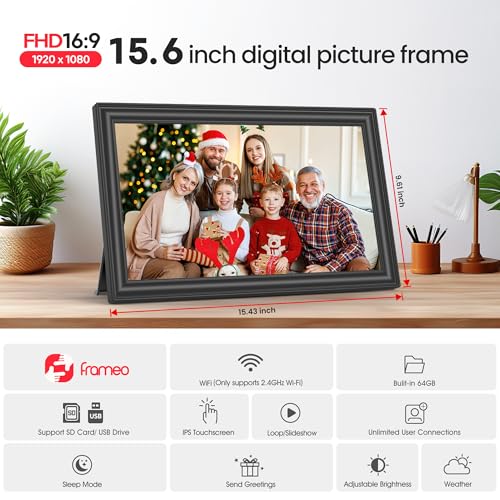
The 64GB 15.6″ Frameo Digital Picture Frame addresses that exact problem. With a bright 1920×1080 IPS touchscreen, plenty of internal storage, and the Frameo app that lets you send photos from anywhere, we found it an intuitive, feature-rich way to keep family moments on display without the usual friction.
64GB 15.6" Frameo WiFi Digital Frame

64GB 15.6" Frameo WiFi Digital Frame
This digital frame offers an intuitive and user-friendly experience for sharing family moments. Its large IPS display, ample storage, and integration with the Frameo app make it an ideal choice for parents and grandparents.
Overview
We approached this 64GB 15.6″ Frameo digital picture frame expecting a family-friendly device that balances picture quality, remote convenience, and simplicity. In daily use it behaves like a modern digital photo album: vivid images, smooth slideshows, and an app-based sharing flow that removes the need for manual transfers. The device’s build is plastic but solid, and the 15.6-inch size makes it large enough to sit on a mantel or be mounted on a wall without overwhelming the room.
Setup & Connectivity
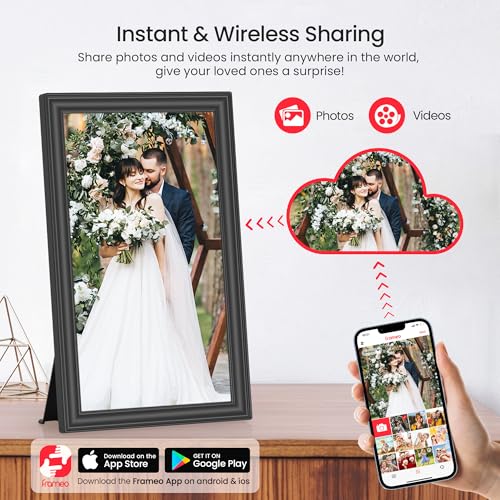
The initial setup is straightforward: plug in, connect to a 2.4GHz Wi‑Fi network, and pair via the Frameo app. The app provides an intuitive way to invite family members, control slideshow order and send images remotely. We appreciated how the app lets non-technical relatives push photos from anywhere without needing to access the frame directly.
Display & Touch Experience
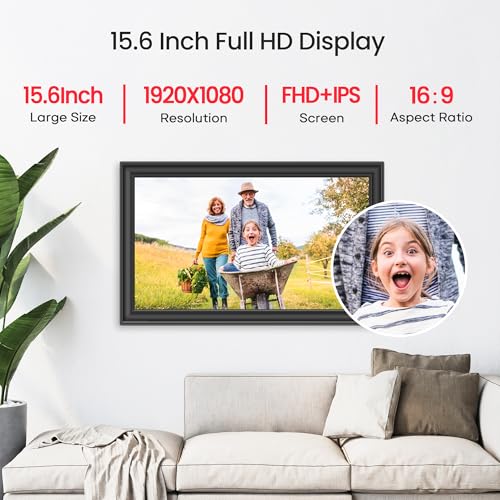
The 1920 x 1080 IPS panel produces sharper, more natural colors than you expect at this price point. Viewing angles are excellent, so photos look consistent whether you encounter the frame head-on or from the side. The touchscreen is responsive for basic navigation: swiping through photos, tapping settings, and adjusting brightness all feel immediate. For those who prefer a more set-and-forget approach, the slideshow mode takes over and runs smoothly with configurable transitions and timing.
Storage & File Compatibility
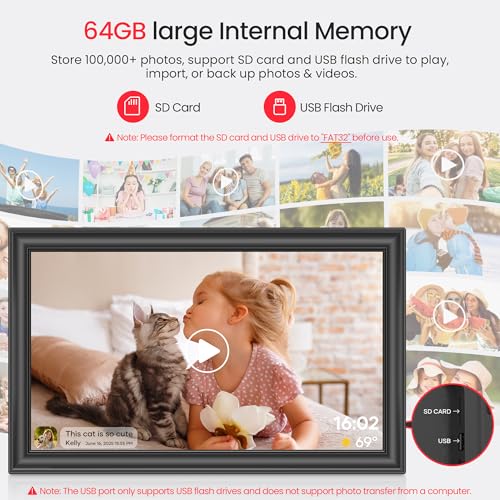
This model ships with 64GB of internal storage, which we found generous for everyday family use—thousands of photos and many short videos can be stored locally. There’s also expansion via SD card and USB flash drive for easy bulk import or backups. We tested common image formats and MP4 videos; JPG, JPEG, BMP, and PNG were handled consistently. Note that the Frameo app limits remote videos to 15 seconds, while a direct SD or USB import allows longer clips (subject to the device’s playback limits).
Specification Snapshot
| Feature | Detail |
|---|---|
| Display | 15.6″ IPS Full HD (1920 x 1080) |
| Storage | 64GB internal; SD card & USB flash supported |
| Connectivity | Wi‑Fi (2.4GHz only), Frameo app (iOS & Android) |
| File Support | JPG, JPEG, BMP, PNG, MP4 (short video via app) |
| Extras | Touchscreen, built-in speaker, clock/weather, sleep mode |
Daily Use & Practical Features
We used the frame in both portrait and landscape and appreciated the auto-rotate function when switching orientations. Built-in features such as clock and weather are small but meaningful touches for a frequently-viewed object. The reply emoji capability in the Frameo app adds a social element; senders can get quick feedback without fuss.
There are a few practical tips we learned while testing:
Mounting, Placement & Power
The frame is light enough (about 3.2 pounds) to place on a table with the included stand or hang on a wall using the keyhole mount. Since it runs from DC power, plan where it will live with access to a socket. The Type‑C power connector is convenient but delicate; we recommend teaching family members to insert it gently to avoid stress on the port.
Audio & Video
A built-in speaker allows short videos to play with sound when imported via SD or USB; the app-limited video length is useful for quick greetings but may frustrate users who want full-length clips sent remotely. We found audio adequate for short clips and voice messages, though audiophiles should not expect high-fidelity sound—the speaker’s role is to supplement visual content, not replace a dedicated media system.
What Makes It a Good Gift
We evaluate a gift item by how easy it is to hand off and enjoy with minimal help. This frame scores well because:
What We Liked Most
Considerations & Limitations
Final Thoughts
Overall, we see this 15.6″ Frameo digital frame as a thoughtful, practical device for keeping family memories on display and staying connected across distances. Its combination of a large, high-quality screen, significant internal storage, and a friendly app workflow makes it especially valuable for gifting to parents and grandparents who want an easy, attractive way to receive photos and short videos. While it has a few connectivity and format caveats, these are manageable in exchange for the convenience and emotional payoff the frame delivers.
FAQ
Yes. The Frameo app allows you to invite multiple contributors. Each invited person can send photos or short videos remotely, and the frame queues them for display. We recommend coordinating a little at first so everyone understands how to add captions or set photo order if that matters to you.
This frame only supports 2.4GHz Wi‑Fi bands. If your home network is set to 5GHz only, you’ll need to enable a 2.4GHz network on your router or add a dual‑band network. 2.4GHz gives better range through walls, which is helpful if the frame sits far from the router.
You can export photos to an SD card or USB flash drive and copy them to a computer for safekeeping. Make sure the removable media is formatted as FAT32 for best compatibility. Regular backups are a good habit if the photos are sentimental.
We designed our testing around simplicity. The frame itself is mostly automatic once set up, and the Frameo app handles sending content from afar. For in-person use, the touchscreen is straightforward, and the slideshow option removes the need for frequent interaction.
Via the Frameo app, uploaded videos are capped at 15 seconds. If you want longer clips, import them directly with an SD card or USB flash drive. Be mindful of the frame’s playback compatibility and file formats when preparing longer videos.
Place the frame away from direct sunlight to minimize screen glare and color washout. Use the brightness control and auto-sleep scheduling to reduce eye strain and save power. For group viewing, a wall mount at eye level in a common space works particularly well.
Author

Like this deal? Get deals like this every week.